
Why DNS change monitoring matters
DNS is the only part of a client's setup that anyone can change without a deploy, a log entry or a word to you. Here is what lives in a zone, the five ways it quietly breaks, and what a useful DNS alert looks like.
Almost everything that can break a client’s website leaves a trail. A bad deploy is in the git history. A plugin update is in the CMS log. A server change is in the host’s audit trail. You can find out who did what, and when.
DNS is the exception. It sits outside the site entirely, it can be edited by anyone with the registrar password, and in most setups a change leaves no record that you or the client will ever look at. The site does not go down in a way that pages you. It just starts pointing somewhere else, or stops receiving email, and the first report usually arrives days later from a customer who could not get through.
DNS is a config file nobody versions
A DNS zone is configuration, in the same sense that an nginx file or an environment variable is configuration. The difference is that nobody treats it that way.
It is not in the repository. It is rarely in a change log. It is frequently edited through a registrar’s web interface by whoever happens to have the login, which over a site’s life can include the client, a previous developer, an IT supplier, a hosting company’s migration team and a marketing agency that needed to verify a tool.
The result is a piece of production configuration with no version control, no review, no rollback and no notification. If you had that on any other part of the stack you would treat it as an incident waiting to happen. DNS gets a pass because it usually works.
What lives in a zone, and what breaks when it changes
Most zones are small. Ten to twenty records, half of them verification strings for tools nobody remembers signing up for. The impact of each one changing is very different, which is why “monitor DNS” needs to mean something more specific than “check the domain resolves”.
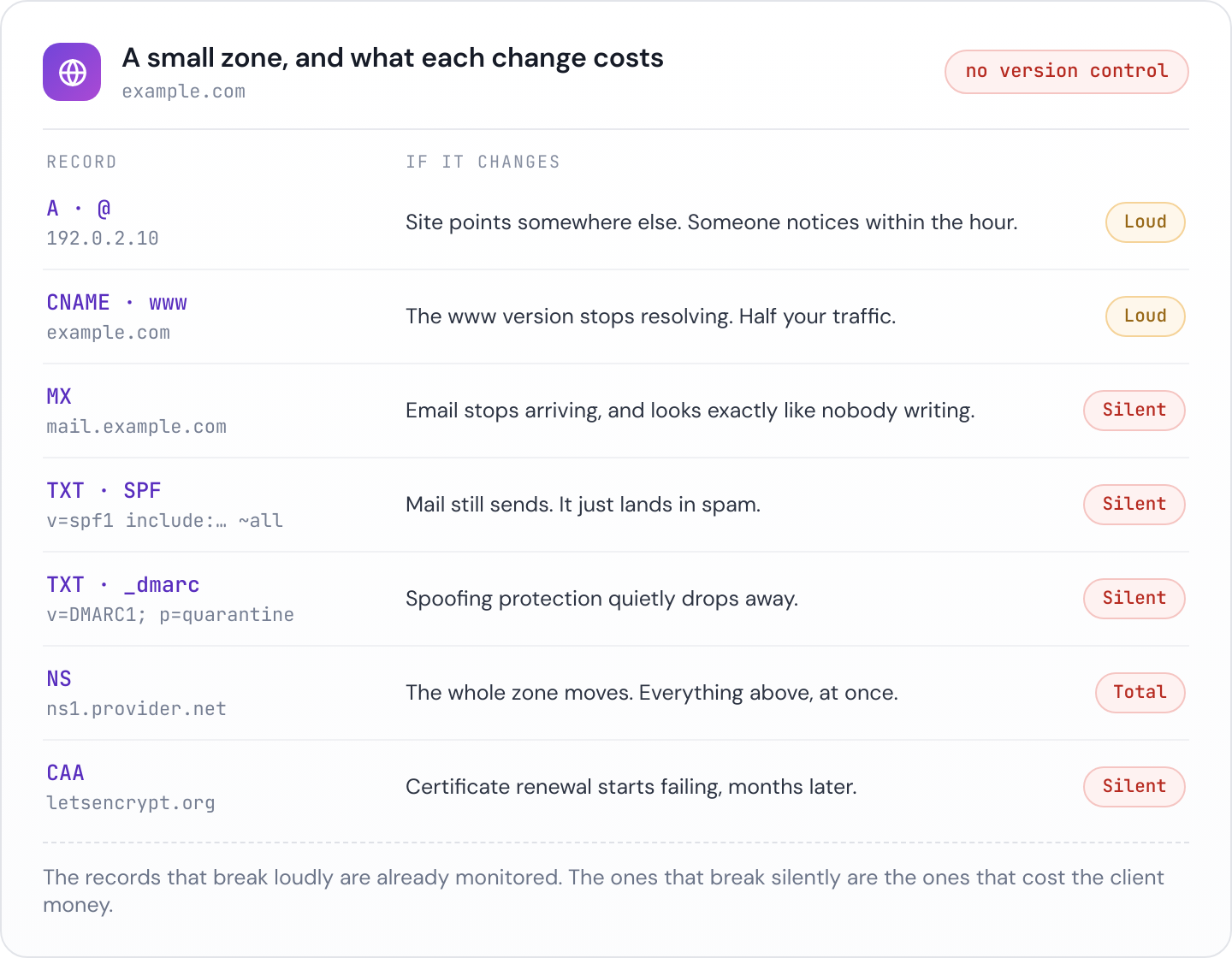
The pattern worth internalising: the records that break loudly are the ones you already monitor, and the records that break quietly are the ones that cost the client money.
If the A record moves, the site goes to the wrong place and somebody notices within the hour. If the MX record moves, email stops arriving, and because email failing to arrive looks exactly like nobody having emailed you, it can run for days. If the SPF record is replaced by a new supplier’s record rather than merged with the existing one, mail still sends, it just starts landing in spam, and you will hear about it as “our open rate has dropped”.
Nameserver records deserve their own mention. Changing the NS records moves the whole zone to a different provider, and the new provider only has the records somebody remembered to recreate. Everything else disappears at once. This is the single most destructive DNS change available, and it is a two field edit at the registrar.
Five ways DNS quietly breaks
A registrar or host migration. Somebody moves the domain or the hosting and rebuilds the zone from what they can see, which is the website records. The TXT record verifying the client’s Google Workspace, the CNAME for the email marketing subdomain and the DKIM selectors are not obvious from looking at a website, so they do not come across.
A domain expiring against a dead card. Auto renew is on, and it has been on for four years, which is exactly why nobody checks it. Then the client’s finance team reissues the company card. The renewal fails, the reminder emails go to an inbox belonging to somebody who left, and the domain lapses. Recovery is possible but the redemption fees are unpleasant and the downtime is real.
A nameserver change that drops half the zone. Covered above, and it happens most often when a client moves hosting and the new host offers to “handle the DNS for you”.
A marketing tool given the apex record. A tool asks for a CNAME on a subdomain. Whoever sets it up puts it on the root domain instead, or replaces an existing record rather than adding one. Sometimes the site goes down. More often something subtler happens, like the SPF record being overwritten because the tool’s instructions said to add a TXT record and the interface only allowed one.
TTL and propagation confusion. A record is corrected quickly, but the old value has a 24 hour TTL, so some users see the fix immediately and others do not see it for a day. This produces the worst kind of support conversation, the one where the client insists the site is down and you can see that it is fine.
Why you find out last
Consider who is likely to notice each of these first.
For a website outage, your uptime monitor tells you, assuming you have one pointed at the right hostname. For anything else, the chain is longer. A customer tries to email the client. The message bounces or lands in spam. The customer assumes they are being ignored, or tries again later, or gives up. Eventually somebody mentions it to the client. The client mentions it to you, usually with the phrasing “has something changed with our website”.
By that point the change is often weeks old and the person who made it has forgotten. You are debugging a config change with no timestamp and no author, which is a bad position to start from and an expensive one to bill for.
What a useful DNS alert actually looks like
“Your DNS changed” is not useful on its own, because DNS legitimately changes. What you need is the diff.
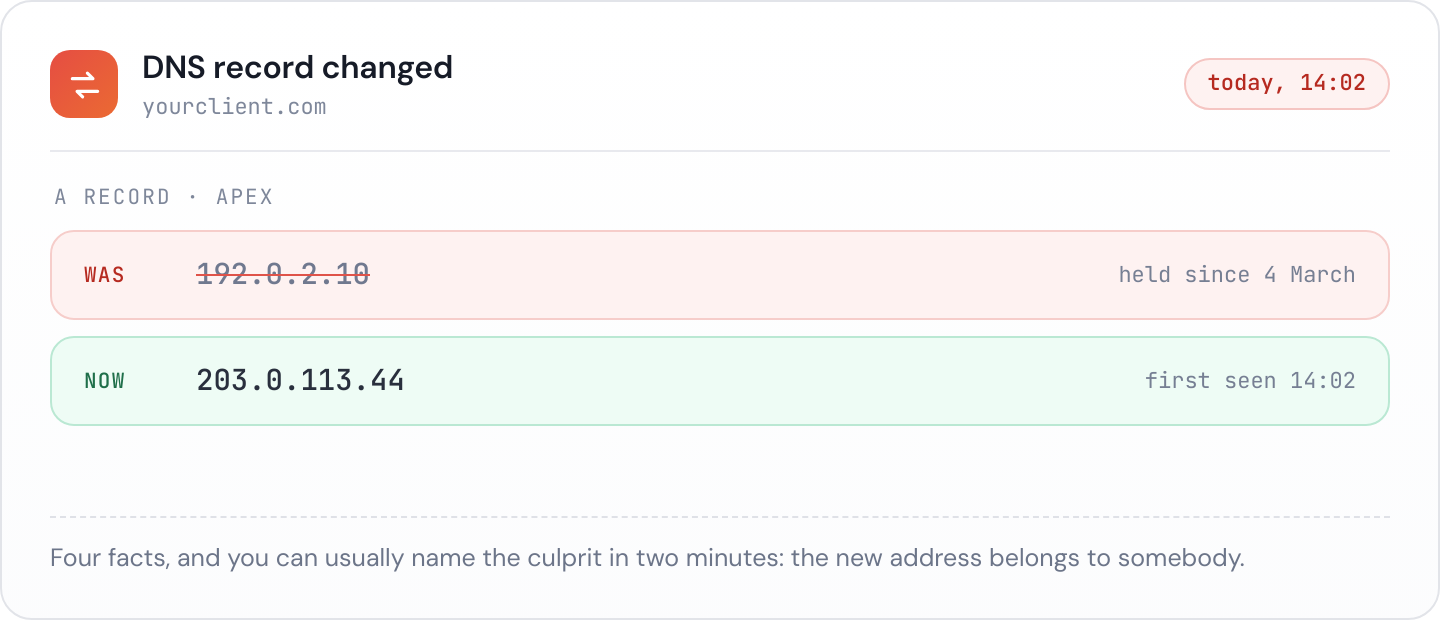
A good alert answers four questions immediately. Which record changed. What it was before. What it is now. When the change was first seen. With those four facts you can usually work out who made the change and why within a couple of minutes, because the new value tends to identify the culprit. A new IP belonging to a hosting company tells you somebody migrated. An unfamiliar TXT record tells you somebody verified a tool.
Worth watching specifically:
- A and AAAA on the apex and www, for silent moves and for a site quietly pointing at a parked page.
- MX and the mail related CNAMEs, because these fail silently and expensively.
- The three email authentication TXT records, SPF, DKIM and DMARC. These are the ones most often clobbered by a well meaning addition. There is more on how they interact in our guide to SPF, DKIM and DMARC.
- NS and the registrar’s own status, because a nameserver change is the one that takes everything with it.
- The domain expiry date, which is not strictly a DNS record but belongs in the same conversation, for the same reason: it changes without telling anybody, and it ends the site when it lapses.
- CAA, if the client has one. A stale CAA record blocks certificate issuance, which turns up as a renewal failure months later rather than as a DNS problem.
Checking a zone by hand
For a one off look, dig gives you the raw answer:
dig +short example.com A
dig +short example.com MX
dig +short example.com NS
dig +short example.com TXT
dig +short _dmarc.example.com TXT
Add @8.8.8.8 or @1.1.1.1 to query a public resolver rather than whatever your machine is using, which matters when you are chasing a propagation question. If you would rather not use the terminal, our DNS lookup tool returns the same records in the browser.
Checking by hand is fine for diagnosis. It is useless as prevention, because it only tells you the state right now, and the whole problem with DNS changes is that you do not know to look.
Add it to the care plan
DNS monitoring is one of the easiest things to include in a care plan and one of the easiest to justify, because the failure it prevents is the kind clients understand without a technical explanation. “We noticed your email records changed the same afternoon and had it put back before anyone missed a message” is a story that sells a renewal on its own.
Janitor records the DNS for every domain you manage, checks it on a schedule and tells you what changed, what it was before and when it happened, alongside the domain expiry and the email authentication records. It goes in the client’s monthly report too, so the quiet months are visible rather than invisible.