
How to onboard a client site onto a care plan
A care plan becomes profitable or painful in the first fortnight. Here is the onboarding process that gets you full access, a defensible baseline, a separate bill for inherited problems and monitoring running from day one.
A care plan is sold on a promise: the site will be looked after, and you will notice problems before the client does. Whether that promise is profitable is decided in the first two weeks, not in the sales meeting.
Onboarding is when you find out what you actually agreed to maintain. The plugin nobody has updated since 2021. The certificate renewing against a card that expired last spring. The registrar login that belongs to a contractor who stopped answering emails in 2023. Handle those properly at the start and the retainer runs quietly for years. Skip them and you spend six months absorbing somebody else’s neglect at your own cost, while the client wonders what they are paying for.
Onboarding is a scoping exercise, not an admin task
The instinct is to treat onboarding as paperwork: collect a few passwords, add the site to a list, start the clock. That framing is why so many care plans lose money.
What you are really doing is establishing three things. What state the site is in today. What you are responsible for, and what you are not. And what evidence you will use, twelve months from now, to show the client the money was well spent. Every step below feeds one of those three.
Budget real time for it. Two to four hours for a small brochure site, a day or more for anything with e-commerce, memberships or a decade of history. Bill it if you can, and if you cannot, at least know you are spending it.
Step one: get access, and get all of it
Partial access is worse than no access, because it lets you believe you are covered. You find the gap at the worst possible moment, usually at eleven at night with a client on the phone.
Work from a written inventory rather than asking “can you send me the logins”. Clients send what they remember, which is the CMS password and nothing else.
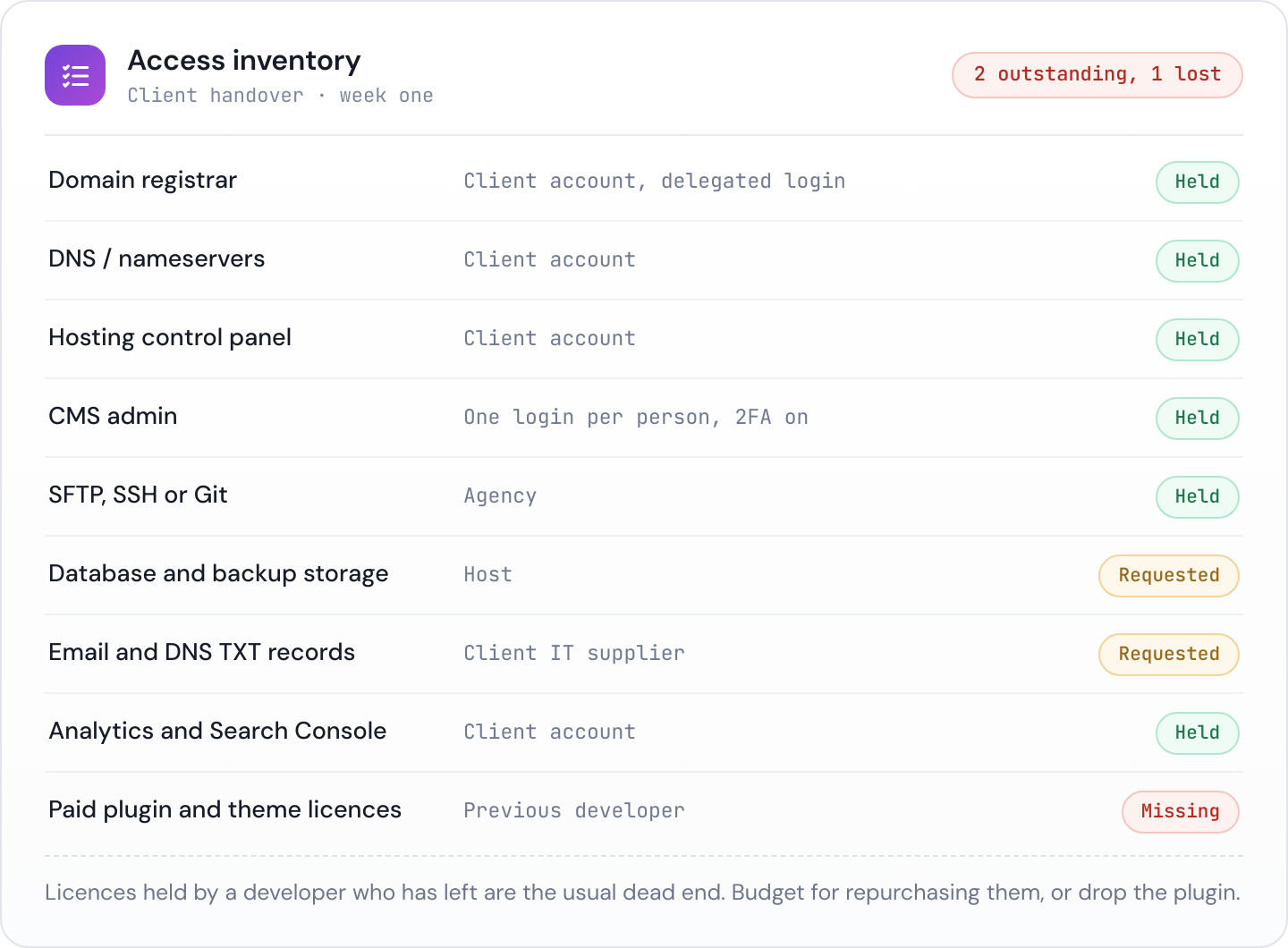
Two distinctions matter more than the rest.
Ownership is not the same as access. The domain and the hosting account should be in the client’s name, with their billing details, and you should hold delegated access. Agencies that register domains on their own account create a hostage situation nobody intended, and it always surfaces during an awkward offboarding. Where the client already owns things, resist the urge to consolidate them under you.
Shared logins are a liability. Every person who needs access should have their own account with their own second factor. If the site only supports one admin login, put the credentials in a shared password manager vault rather than a spreadsheet, an email thread or somebody’s notes app, and record who has been given the vault.
While you are collecting, write down the renewal dates and the card on file for the domain, the hosting and any paid plugins or licences. A domain that expires because the client changed banks is not a technical failure, but it will be your problem to fix.
Step two: take a baseline before you touch anything
Before the first update, the first plugin removal, the first tidy-up, record the state of the site. This is the single most valuable half hour in the whole process, for two separate reasons.
The first is commercial. A retainer is easiest to justify against a starting point. “The site is fine” is not a story. “Health score 61 in August, 94 by October, and here is what we fixed” is.
The second is defensive. Something will break in week three. When it does, you want to be able to say, with evidence, whether it was already broken when you arrived.
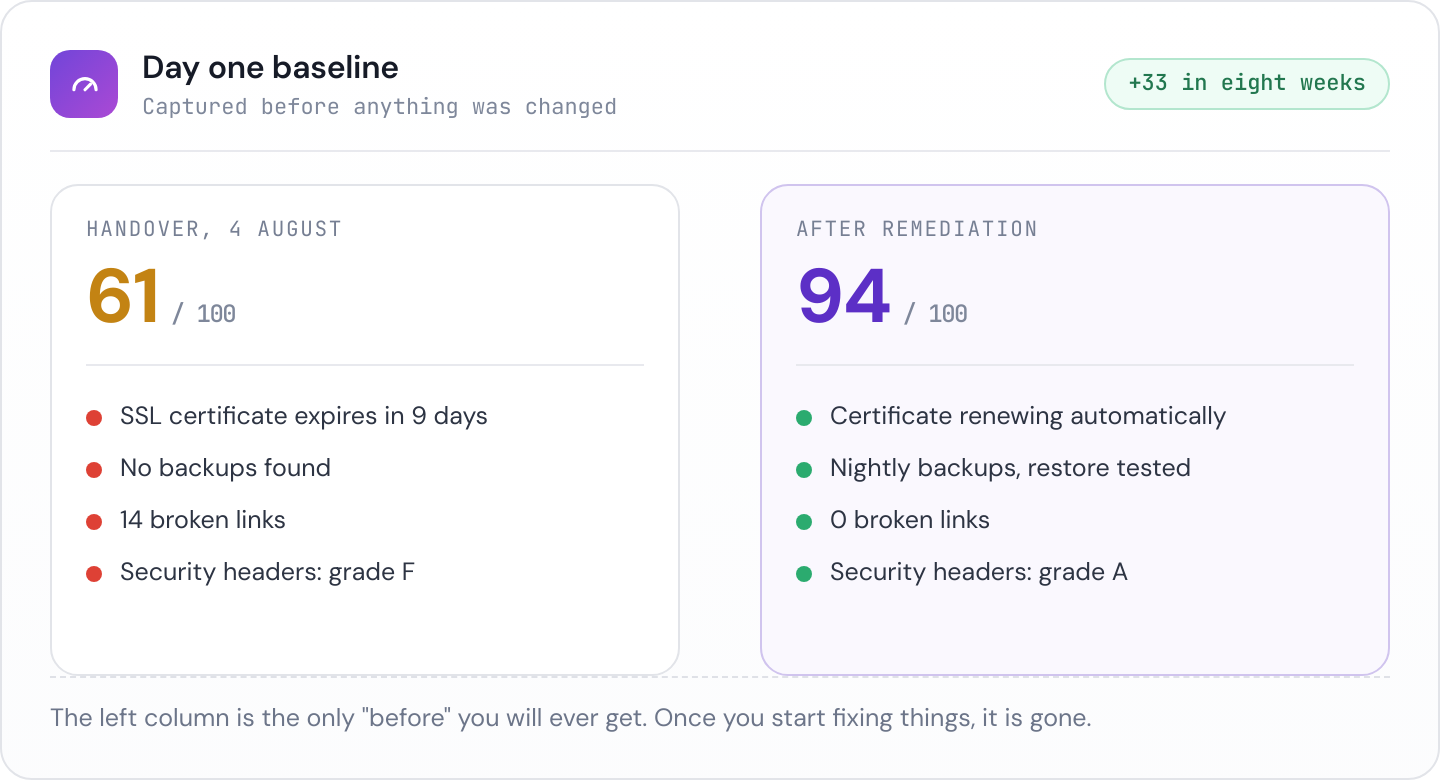
Capture at least: current uptime, the SSL certificate issuer and expiry, the domain expiry, the full set of DNS records, the security headers, a broken link scan, the CMS and plugin versions, whether backups exist, and whether analytics and Search Console are actually installed and reporting. Our free website health check covers most of that in one pass if you would rather not do it by hand.
Save the output somewhere permanent and dated. A PDF in the client folder is fine. A monitoring tool that keeps the history for you is better, because in eighteen months you will not remember which folder.
Step three: separate inherited problems from ongoing care
This is where most care plans quietly go wrong. The site arrives with forty pending updates, a broken contact form, no backups and a plugin the developer abandoned in 2020. That work is not maintenance. It is remediation, and it belongs in a separate line item.
Fold it into the monthly fee and two things happen. You work at a loss for the first quarter, and you train the client to expect project work at retainer prices for the rest of the relationship.
Instead, turn the baseline into a short remediation list, put a fixed price on it, and present it as the thing that gets the site to the standard the plan assumes. Most clients say yes, because the list came with evidence attached rather than opinions. The ones who say no have told you something useful about how the relationship will go, and you can price the ongoing plan accordingly.
Be clear about what happens if they decline. If the site stays on an unsupported PHP version because the client will not fund the upgrade, write that down. It is not an unreasonable position for them to take, but it should not become your liability by default.
Step four: turn monitoring on the same day
The plan promises you will notice problems first. That promise only holds from the moment the checks start running, so start them during onboarding rather than “once things settle down”.
Day one monitoring also gives you something subtle and useful: a clean record with no gaps. When you show a client twelve months of uptime, an unexplained blank fortnight at the start invites exactly the question you do not want.
Set the alerting up properly at the same time. Decide who gets paged for a site being down, who gets a weekly digest, and what the client is told directly rather than through you. An alert channel nobody reads is the same as no monitoring, only more expensive.
Step five: write down what is in scope
Scope disputes are almost never about big things. They are about the twenty minute favour, asked for the ninth time.
Put in writing, in plain language:
- What is included every month. Updates, backups, monitoring, the report, and a stated allowance of small changes if you offer one.
- What is not. New pages, design work, integrations, content writing, third party support, anything involving a plugin you did not install.
- How work is requested. One channel. Not one channel plus texts plus a project manager’s mobile at the weekend.
- What response time means. Distinguish “the site is down” from “can we change this photo”, with a target for each.
- What happens to out of scope requests. Quoted separately, or drawn from a bank of hours, but never absorbed silently.
Send it as part of the welcome, not buried in a contract appendix. The point is that the client has read it.
Step six: restore a backup before you need one
An untested backup is a rumour. During onboarding, take a backup and restore it somewhere disposable, a staging subdomain or a local environment. You are checking three things: that the backup runs, that it contains the database as well as the files, and that you can get a working site back from it without needing anything you do not have.
This takes an hour and it is the only way to find out that the nightly backup has been silently failing since the host changed their storage limits.
Step seven: send a report in the first month
Do not wait for a quarter to pass. The first report sets the expectation that reporting happens, and it lands while the client still remembers agreeing to the plan.
The first one writes itself, because you have the baseline. Here is what we found, here is what we fixed, here is what we are watching, here is the current state. Send it under your own branding, keep it short, and make the improvement visible.
A two week timeline that works
- Day 1. Send the access inventory and the scope summary. Start monitoring on whatever access you already have.
- Days 2 to 4. Chase the gaps in the inventory. Nothing else blocks on this, but nothing is finished until it is closed.
- Day 5. Capture the baseline, dated and saved.
- Days 6 to 8. Test a restore. Write the remediation list and price it.
- Day 9. Present the remediation quote alongside the baseline, so the two are read together.
- Days 10 to 14. Do the agreed remediation. Confirm alerting routes to the right people.
- End of month one. Send the first report, showing the baseline and what changed.
What to keep afterwards
Three artefacts outlive the onboarding and should live somewhere your team can find them without asking you: the access inventory, the dated baseline, and the scope summary. Everything you will need in a renewal conversation, a dispute, or a handover to a colleague comes from one of those three.
Then let it run
Onboarding is deliberately front loaded so the following months are not. Once access is complete, the baseline is recorded and the remediation is done, a care plan should mostly consist of checks running quietly and a report going out on time.
Janitor handles that half. It runs around two dozen checks on every site you manage, keeps the history from the day you add a site, and turns it into a branded report you can send without writing it. Add the client’s site on day one of onboarding and the baseline captures itself.