
Cookie consent and pre-consent tracking under UK GDPR
The banner is the visible part. The compliance problem is what loads before anyone clicks it. A practical guide to PECR, UK GDPR, what a valid banner looks like and how to check a client site in five minutes.
Most agencies treat cookie consent as a component. Drop in a banner, pick a colour, tick it off the launch checklist. The banner is the part everyone can see, so it is the part that gets the attention.
The problem is that a banner does not stop anything by itself. On a large number of sites with a perfectly presentable consent banner, Google Analytics, the Meta pixel and a session recorder have already loaded and set their identifiers before the visitor has read a word of it. The banner is decoration over a request that already happened.
This guide covers what the rules actually require, what a valid banner looks like, why pre-consent tracking is the failure that matters most, and how to check a client site quickly. It is written for people who build and maintain sites rather than lawyers, and it is not legal advice.
Two sets of rules, not one
The single most useful thing to understand is that cookies in the UK are governed by two overlapping regimes, and people usually only think about one of them.
PECR is the Privacy and Electronic Communications Regulations. Regulation 6 is the relevant part, and it says that storing information on, or gaining access to information stored on, a user’s device requires clear information and consent. There is one exception, for storage or access that is strictly necessary to provide a service the user has explicitly requested.
Note what that covers. It is not limited to cookies, and it is not limited to personal data. Local storage, session storage, and reading device characteristics for fingerprinting all involve storing or accessing information on the device, so they all fall inside regulation 6. A tracker that avoids cookies is not thereby outside the rules.
UK GDPR does not decide whether you need consent. It decides what consent has to look like when you need it. Freely given, specific, informed and unambiguous, given by a clear affirmative action, and as easy to withdraw as it was to give. UK GDPR also governs what you then do with the personal data you have collected.
The practical consequence is a two step test. PECR asks whether you need consent for a given piece of storage or access. UK GDPR asks whether the consent you obtained is worth anything.
”Strictly necessary” is narrower than people assume
The strictly necessary exemption is read far too generously in practice. It means necessary for a service the user has asked for, not necessary for the business.
Comfortably inside it: the session cookie that keeps someone logged in, the shopping basket, a load balancing cookie, a security token, and the cookie that remembers the visitor’s own consent choices.
Outside it, regardless of how the vendor markets them: analytics of any kind, advertising and remarketing pixels, session recording and heatmaps, A/B testing, personalisation, and third party embeds that set their own cookies.
Analytics is the one that causes arguments. It is genuinely useful, it feels harmless, and site owners reasonably feel that measuring their own traffic should not need permission. The ICO has been consistent that analytics cookies are not strictly necessary, and the fact that the data is only used internally does not change that. It has to be gated.
Third party embeds are the ones that get forgotten. A standard YouTube embed sets cookies as soon as the page loads, which is why youtube-nocookie.com exists. Embedded maps, social feeds, chat widgets, review carousels and font services can all set storage or make identifiable requests before a visitor has done anything at all.
What a valid banner looks like
The requirements follow directly from the UK GDPR definition of consent, and they are mostly about symmetry.
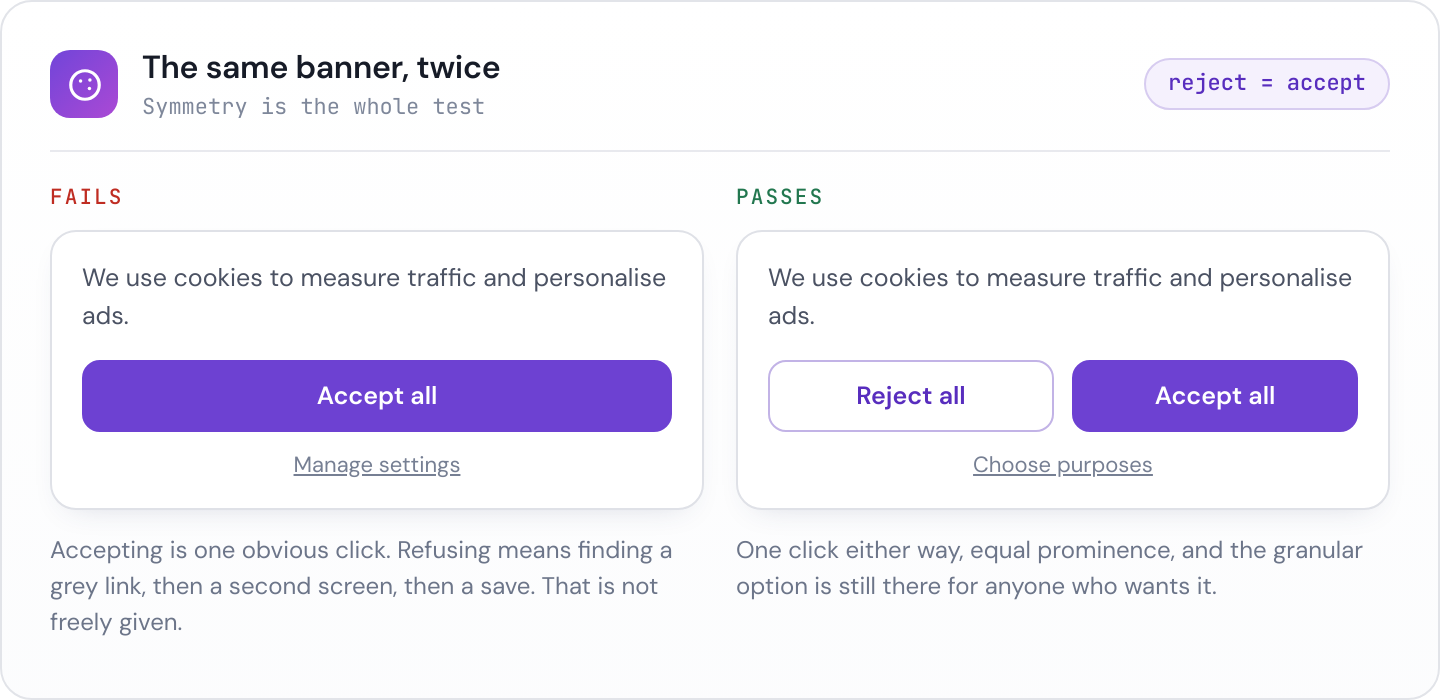
- Rejecting must be as easy as accepting. A prominent “Accept all” next to a faint text link reading “Manage preferences” fails, because refusing costs more clicks and more attention than agreeing. This is the single most common issue, and it is the one the ICO has actively written to large UK websites about.
- Nothing non-essential fires before a choice is made. Covered in detail below, and it is the requirement most often broken.
- No pre-ticked boxes and no implied consent. “By continuing to browse you agree” is not a clear affirmative action. Neither is a toggle that starts in the on position.
- Granular by purpose. Visitors should be able to accept analytics without accepting advertising. Bundling everything into one switch is not specific consent.
- Withdrawal must be as easy as giving. In practice this means a persistent link or floating control that reopens the preferences, not an instruction to clear cookies in the browser settings.
- Design must not nudge. Contrast, size and ordering all count. If the reject control is grey on grey and the accept control is a large filled button, the consent is not freely given regardless of what the text says.
- Cookie walls are risky. Blocking access entirely unless the visitor accepts tracking undermines “freely given” in most contexts. There are narrow situations where an alternative such as a paid option is defensible, but it is not something to do casually on a client’s brochure site.
The failure nobody sees
Everything above is visible. You can look at a banner and judge it. The failure that actually generates complaints is invisible from the front end, and it is this: the tags fire before the banner does anything.
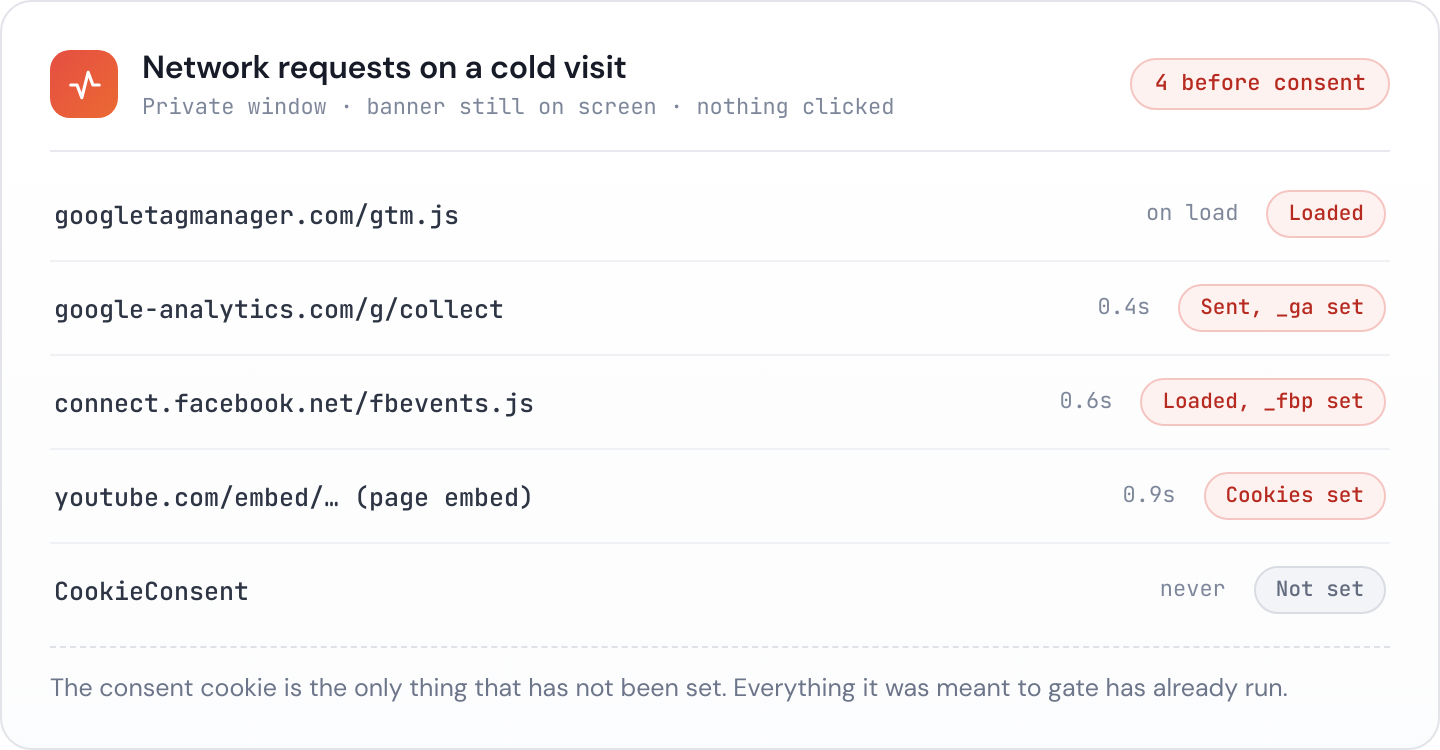
It happens for ordinary, undramatic reasons.
A script tag was hard coded into the theme header during a rush, and the consent platform was added afterwards without anyone going back to remove it. Google Tag Manager is loaded unconditionally and the tags inside it fire on page view without a consent trigger. A plugin injects its own pixel outside the consent manager entirely. Somebody added a new tag six months after launch and nobody re-tested. An embed was pasted into a page by a content editor who had no idea it set cookies.
In every case the banner still appears, still looks correct, and still records the visitor’s choice. It simply arrives after the event. From a regulator’s point of view, and from a complainant’s, the site collected without permission.
This matters more than banner styling because it is the substantive breach rather than the presentational one, and because it is the one a technically literate visitor can demonstrate in thirty seconds with the network tab open.
Consent Mode is not the same as consent
Google’s Consent Mode is frequently mistaken for a compliance solution. It is worth being precise about what it does.
In its basic form, tags do not fire until consent signals allow them, which is what you want. In advanced mode, tags load and send cookieless pings before consent, and Google models the missing data afterwards. Those pings still involve a request to a third party from the visitor’s browser.
Consent Mode is a way of preserving measurement quality while respecting a consent signal. It is not a substitute for a consent management platform that blocks tags by default, and configuring it does not by itself make a site compliant. If it is in place, check which version is running, and check what actually leaves the browser before a click.
Checking a client site in five minutes
You do not need specialist tooling for a first pass.
- Open the site in a fresh private window so no previous consent is stored.
- Open developer tools, go to the Network tab, and reload the page without touching the banner.
- Filter for the usual suspects:
google-analytics,googletagmanager,collect,facebook,connect.facebook.net,hotjar,linkedin,doubleclick,youtube. - Check Application, then Cookies and Local Storage, for anything set before a choice was made.
- Now click reject all, reload, and repeat. A surprising number of banners record the rejection and load the tags anyway.
- Finally, look for the way back in. Can you find a control to change your mind without hunting?
Step five catches the failure that survives everything else, because a banner that ignores its own reject button passes every visual inspection.
Our cookie consent checker tells you whether a recognised consent platform is present on a page, and the pre-consent tracking checker reports which known trackers would load on a cold visit. Between them they cover the two questions above without opening developer tools, which is useful when you are triaging a portfolio rather than one site.
Who carries the risk
For a client site, the client is the data controller and carries the primary legal responsibility. Agencies generally act as processors or as suppliers of a deliverable. That is the formal position.
The practical position is different. When a complaint arrives, the client will forward it to whoever built the site, and the conversation starts with “we thought this was handled”. Whether or not the liability is yours, the remediation work and the reputational damage usually are.
The reasonable response is not to accept liability you do not have. It is to make the state of the site visible, so that decisions about it are made deliberately. A short note in the monthly report saying that the Meta pixel is firing before consent, dated, does two useful things. It gives the client the chance to act, and it means nobody can later claim they were not told.
Banners regress
A site that was correct at launch does not stay correct. Consent is a configuration that lives at the intersection of marketing, development and whoever last edited a page, which is the worst possible ownership structure.
The things that break it are routine. A new campaign needs a new pixel. A redesign drops the consent script from one template. A plugin update changes how tags are injected. A CMS migration carries over the pages but not the tag manager configuration. Each of these can move a site from compliant to not, silently, with nothing visibly different on the page.
That makes consent a monitoring problem rather than a launch checklist item. Janitor checks each site you manage for a consent banner and for trackers that load before consent, on a schedule, and flags it when a site that was fine last month is not. It goes into the client report as well, which turns an awkward compliance conversation into a line item somebody has already read.